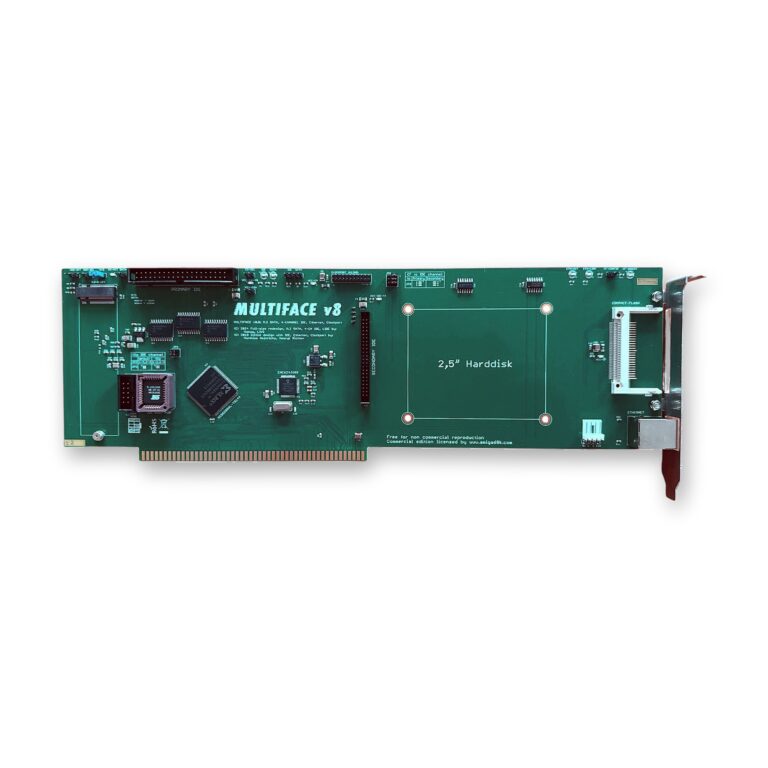
Imagine your Amiga 2000, 3000 or 4000 booting silently from an SSD, sharing files with your PC over the network and playing 16-bit sound from a clock port card, all from a single Zorro slot. That is what the Multiface does. This guide shows what the card makes possible, how its storage connectors and jumpers work together, and how to get the drives and the network running.
What the Multiface Opens Up
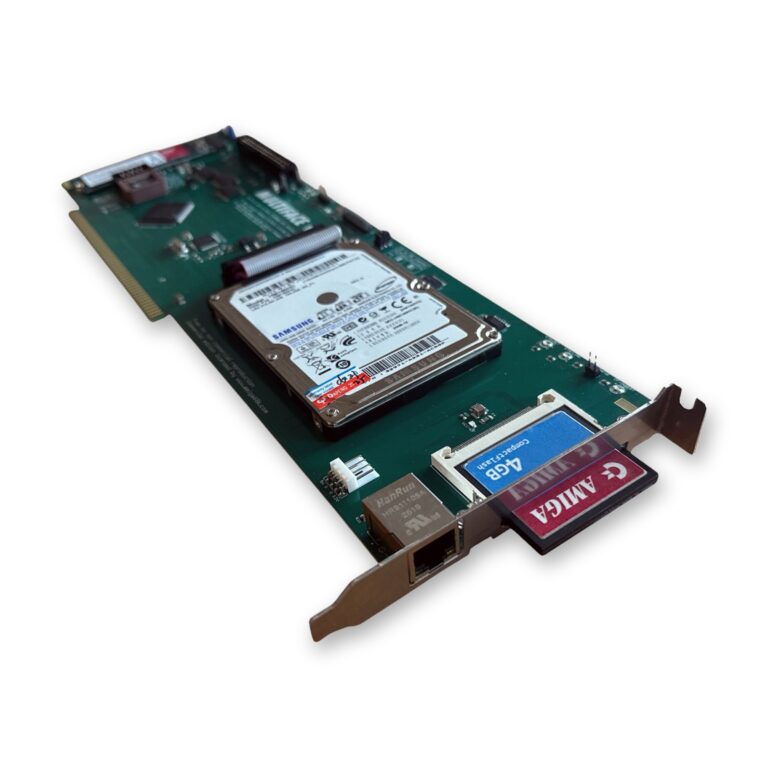
- Silent, fast SSD storage: an M.2 or SATA SSD replaces a noisy, failing old hard drive, with room for AmigaOS 3.2, all your programs and a whole WHDLoad game collection.
- A CD or DVD drive on the second IDE channel, for CD-ROM software and audio CDs.
- Compact-Flash you can reach from outside: a slot on the card’s bracket for an extra drive or for moving data, without opening the case (switch the Amiga off first).
- Your Amiga on the network: copy files to and from your PC or NAS over SMB or FTP, download from Aminet directly, read email, chat on IRC, log in by Telnet or SSH.
- A clock port for A1200-compatible expansions such as a USB interface or a 16-bit sound card.
- More free slots: four functions in one card leave the other Zorro slots for a graphics card or other expansions.
One Card, Four Jobs
Big-box Amigas have Zorro slots, but every card takes one, and many older cards do just one thing. The Multiface combines four functions on one full-length Zorro card:
- a 2-channel IDE interface (primary and secondary) for up to four IDE/ATAPI devices at the same time
- a SATA SSD or an M.2 B-key storage device (one of them, not both at the same time)
- a fast Ethernet port for your network and the Internet
- an A1200-compatible clock port for expansions such as a USB interface or a 16-bit sound card
The card works in every Amiga with Zorro II or Zorro III slots. The IDE interface runs in Zorro II mode on all Amigas. In the A3000(T) and A4000(T), the Ethernet interface switches to Zorro III mode.
Four Ways to Connect Storage
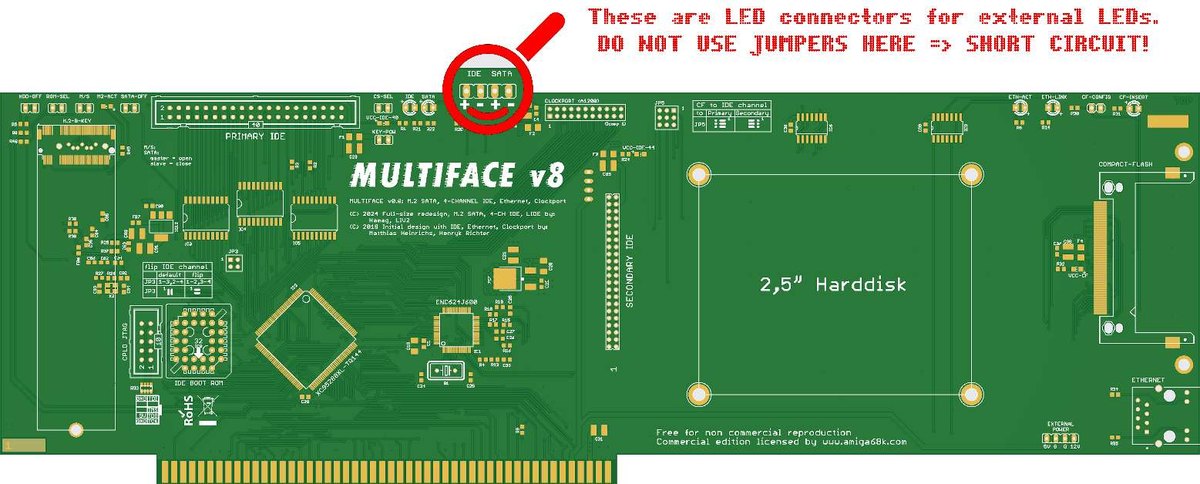
- IDE-40: the classic dual-row 40-pin connector at the top of the card, for hard drives and optical drives (CD-ROM, CD-RW, DVD-ROM, DVD-RW and so on).
- IDE-44: the 44-pin connector in the middle of the card. The four extra pins carry power, so 2.5-inch laptop drives and Compact-Flash adapters need no separate power cable.
- Compact-Flash: a slot on the right edge of the card that you can reach from outside the case. It is not hot-swappable: always switch the Amiga off before you insert or remove a card.
- SATA or M.2: an M.2 socket on the front of the card and a SATA socket at the top of the back. A JM20330 chip translates between parallel and serial ATA. Use one of the two, never both at the same time.
Choosing an M.2 SSD
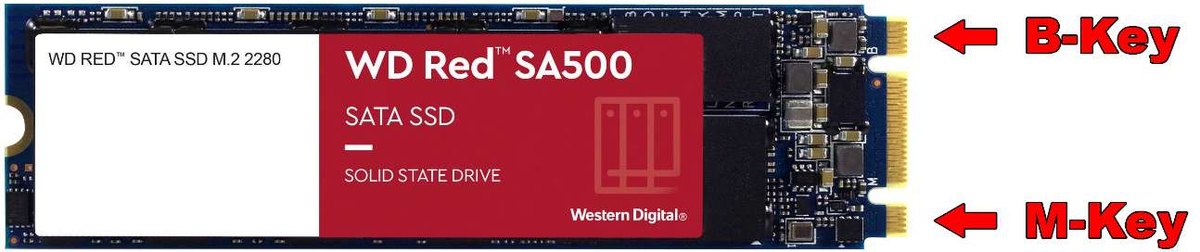
Not every M.2 SSD works. The card needs a SATA SSD, not an NVMe one:
- SSD type: M.2 SATA SSD (NVMe is not supported)
- interface SATA III, protocol AHCI (SATA)
- form factor M.2 2280
- both a B-key and an M-key notch on the connector (drives with only an M-key are NVMe)
How the Drives Are Assigned
Each IDE channel takes two devices, one master and one slave. The card comes set up like this:
| Channel | Master | Slave |
|---|---|---|
| Primary IDE | IDE-40 | Compact-Flash |
| Secondary IDE | IDE-44 | SATA/M.2 |
Factory setting: M/S closed, JP3 in its default position, all three JP5 jumpers on the right, all other jumpers open. The jumpers along the top edge change that:
| Jumper | What it does |
|---|---|
| HDD-OFF | Closed switches both IDE channels off; open (default) leaves them on. |
| M/S | Open: SATA/M.2 is master and IDE-44 slave. Closed: SATA/M.2 is slave and IDE-44 master. |
| SATA-OFF | Disables the SATA/M.2 interface, so the Compact-Flash slot can move to the secondary channel and the primary channel takes two more devices. |
| CF-CONFIG | Open: Compact-Flash is slave. Closed: Compact-Flash is master. |
| JP5 | All three jumpers on the right: Compact-Flash on the primary channel. All three on the left: on the secondary channel. |
| JP3 | Swaps the primary and the secondary channel. |
| CS-SEL | Sets master/slave from outside for drives without their own jumper, such as slim CD/DVD drives. |
| KEY-POW | Puts +5 V on pin 20 of the IDE-40 connector, for example to power some Compact-Flash adapters without an extra cable. |
| ROM-SEL | Selects an alternative driver in the boot EPROM, which has room for more than one. |
One warning: the two small pin headers labelled “IDE” and “SATA” near the middle of the upper edge, next to the two LEDs, are for external LEDs, for example on the case front. Never put a jumper on them: that causes a short circuit.
Setting Up the Drives
The card uses the open-source LIDE driver. It sits in the boot ROM of the card, starts with AmigaOS, and you can boot from the drives. For large drives I strongly recommend AmigaOS 3.2 or newer.
- Open the Tools drawer, select the HDToolBox icon and choose Information from the menu.
- Check that the Tool Types contain SCSI_DEVICE_NAME=lide.device, then save.
- Start HDToolBox, then set up and partition the drives. Set Automount for every device.
- For Compact-Flash cards, always set Mask to 0x7FFFFFFE and MaxTransfer to 0x1FE00.
- CD and DVD drives are mounted with CD0:/CD1: entries in SYS:Devs/. Unit 0 is primary master, unit 1 primary slave, unit 2 secondary master and unit 3 secondary slave.
In normal use the IDE interface transfers between 1.6 MB/s and 2.6 MB/s.
Getting Your Amiga Online
With the Ethernet port your Amiga can exchange files with Linux, Windows and macOS computers over SMB or FTP, browse the web, send email with SimpleMail or YAM, and log in to other machines by Telnet or SSH. You need a TCP/IP stack such as RoadShow, AmiTCP, MiamiDX or Genesis, and a browser such as iBrowse 2.4 with AmiSSL, Voyager or AWeb.
The network driver is on the supplied floppy disk. On an Amiga with a 68020 or faster CPU, copy enc624j6net.device to SYS:Devs/Networks/, then install the TCP/IP stack and the browser. With an original 68000 CPU, copy enc624j6net.device_68000 instead and rename it to enc624j6net.device. For 68000 machines RoadShow is the recommended TCP/IP stack.
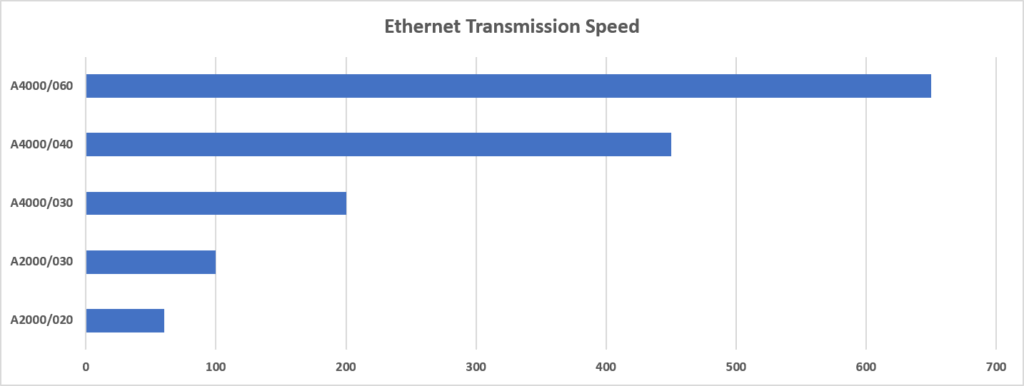
How fast is it? Processing network data in the TCP/IP stack is hard work for the CPU, so the speed depends mostly on the processor. An Amiga 2000 with a 68020 can expect up to 100 kB/s. An Amiga 4000 with a 68060 easily reaches over 600 kB/s, and a 68030 or 68040 lands in between. When you measure, make sure the server you download from provides enough bandwidth. A faster CPU therefore pays off twice: see my guides on the TK68030v2 for the A500 and A2000 and on upgrading the A3000/4000 with a 68060.
My guide Getting Your Amiga Online compares the network options for the other Amiga models.
The Clock Port
The clock port takes the same expansions as the clock port of the Amiga 1200, for example a USB interface or a 16-bit sound card. In a big-box Amiga, that gives you these extras without another Zorro slot.
Updating the Driver
You can update the LIDE driver in the EPROM from the Amiga itself, without an EPROM programmer. Download the ADF of the latest release from the lide.device releases on GitHub (for example lide-update-40.10.adf). Write it to a floppy disk, for example with ADFer from aminet.net, or start it from a Gotek drive. The disk boots straight into the update.
If Something Does Not Show Up
- Only the devices of one channel appear on the Workbench: check that each channel has one master and one slave, that Automount is set in HDToolBox for every device, and try swapping the channels with the two JP3 jumpers.
- The Compact-Flash card does not appear, or a second device on the same channel causes trouble: check Mask 0x7FFFFFFE and MaxTransfer 0x1FE00 in HDToolBox.
- Unstable drives: measure the +5 V rail on the card with a multimeter. If it is below 4.85 V, connect a floppy power cable from the power supply to one of the floppy power connectors on the card.
Multiface or Something Else?
- Multiface: the all-in-one card for the A2000, A3000(T) and A4000(T) when you want SSD storage, Ethernet and a clock port in one slot.
- Multiface Mini: the smaller predecessor with Ethernet, a BSC AT-Bus compatible IDE controller with auto-boot ROM (Kickstart 1.3 to 3.2) and a clock port, for big-box Amigas and an A500 with a Zorro interface. It has no SATA, M.2 or Compact-Flash slot.
- Maximum storage speed in an A3000(T) or A4000(T): the Zorro III DMA SCSI controller ReA4091 with a BlueSCSI v2 reaches 6-8 MB/s in practice. It needs a Super Buster 11 chip.
- A4000 desktop, storage only: the Amiga 4000 IDE Expansion lets the built-in IDE port use both channels, up to four devices.
Who Made It
The first design from 2019, with IDE, Ethernet and the clock port, came from Matthias Heinrichs and Henryk Richter. In 2024 Sven redesigned it as a full-length Zorro card with the SATA/M.2 interface, two IDE channels and the Compact-Flash slot. The LIDE driver is developed by LIV2. I sell this version of the Multiface under an official licence from Sven and pay a royalty for every card.
The full manual is available in English (PDF) and German (PDF).
One slot, four upgrades. Give your big-box Amiga SSD storage, a network connection and a clock port in one go with the Multiface. Not sure which card fits your Amiga? Contact me.