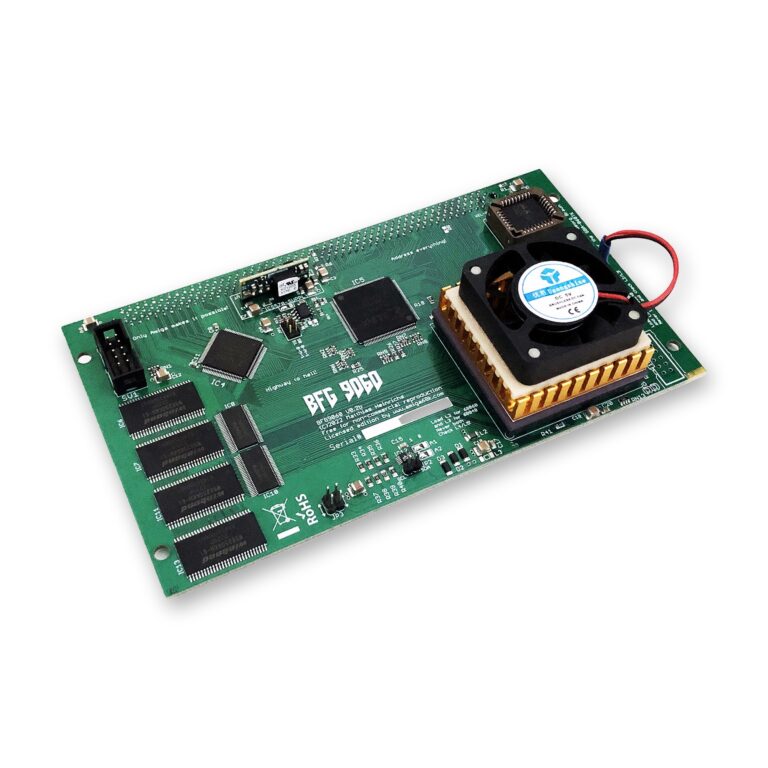
Your Amiga 3000 or 4000 has Zorro III slots, room for a graphics card, a network card and fast storage. What usually holds it back is the CPU. With a 68060 and 128 MB of fast memory on one board, the big-box Amiga becomes the machine it was always meant to be. This guide shows what the BFG9060 accelerator changes, which CPU to choose and how to install it, step by step.
What a 68060 Opens Up
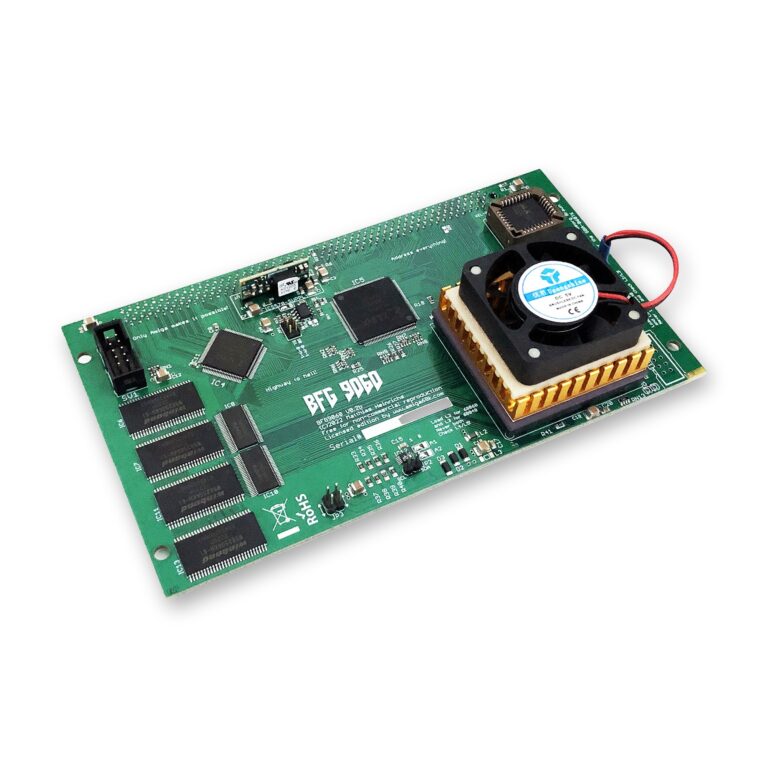
The 68060 is the fastest CPU of Motorola’s 68k family, and the BFG9060 brings it to the A3000(T) and A4000(T) together with 128 MB of Fast RAM. That combination opens up a lot that a stock big-box Amiga struggles with:
- AmigaOS 3.2 that feels instant: windows, drawers and requesters open without waiting, even with many programs running.
- Graphics cards come into their own: an RTG Workbench in high resolutions and many colours needs CPU power, and the 060 delivers it.
- Software written for the 060: ports of Doom and Quake, MP3 playback, image processing and 3D rendering with the built-in FPU of the full MC68060.
- Networking at full speed: the TCP/IP stack is CPU-bound, and an A4000 with a 68060 easily reaches over 600 kB/s on a Multiface network card.
- Room for everything: 128 MB of Fast RAM for large programs, RAM disks and WHDLoad, which installs games to the hard drive.
How Fast Is It?
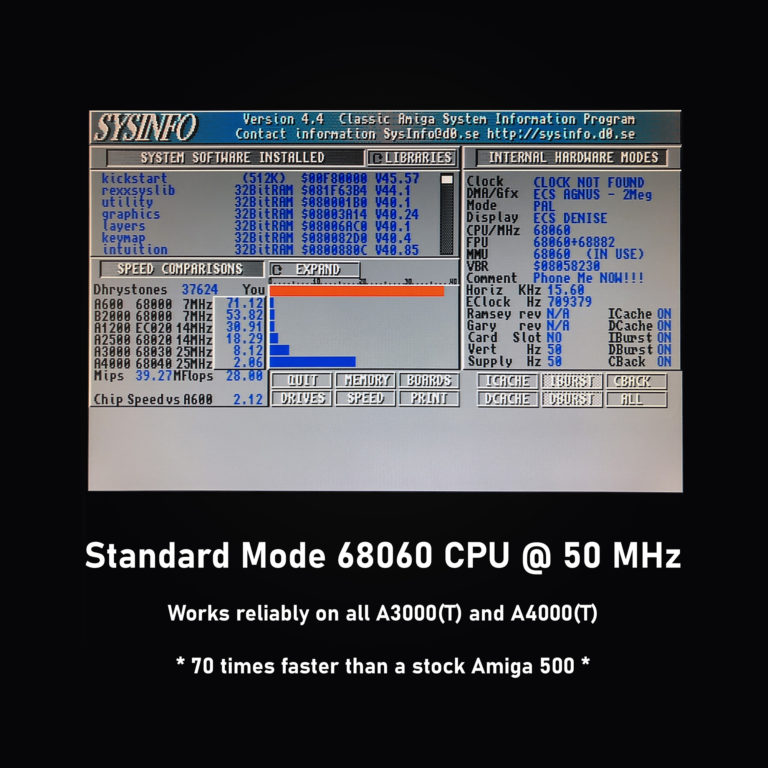
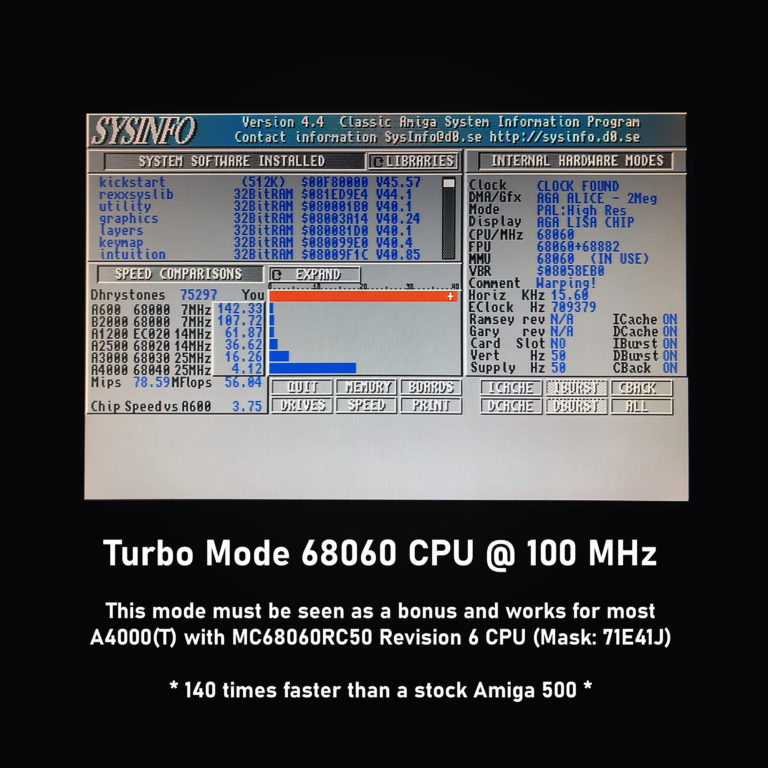
These values come from SysInfo on my test machine, an Amiga 4000 with a BFG9060 and an MC68060RC50 revision 6:
| SysInfo | BFG9060 at 50 MHz |
|---|---|
| Dhrystones | 37,624 |
| MIPS | 39.27 |
| MFlops | 28.00 |
| Compared with an A3000 (68030, 25 MHz) | 8.12 times faster |
| Compared with an A4000 (68040, 25 MHz) | 2.06 times faster |
| Compared with an A600 (68000, 7 MHz) | 71.12 times faster |
In an A4000 or A4000T, a revision 6 MC68060RC50 can run in turbo mode at 75 MHz or even 100 MHz in most cases. At 100 MHz SysInfo shows around 140 times the speed of a stock Amiga 500. Turbo mode is a bonus, not a promise: see the section on overclocking below.
The BFG9060 at a Glance
The BFG9060 is designed by Matthias Heinrichs. I build it brand new under his official licence and pay a royalty for every board. It offers:
- a choice of CPU: MC68060RC50 revision 6 (FPU and MMU), MC68LC060RC50 revision 4 (MMU only) or MC68040RC25 (FPU and MMU)
- 128 MB of very fast on-board Fast RAM that supports DMA and move16 bursts
- a boot ROM that handles every 68040 and 68060, with or without FPU, without a special Kickstart ROM: plug and play
- jumper-selected overclocking to 75 MHz or 100 MHz (MC68060RC50 revision 6 only, in the A4000 and A4000T only)
- options: LTC2990 voltage and temperature monitor, floppy disk with the 68060 library files, low-profile or high-profile heat sink/fan module
- a two-year warranty in case of defect (no warranty for overclocked CPUs)
Which CPU to Choose
- MC68060RC50 revision 6 (mask 71E41J): the full 68060 with MMU and FPU, the latest revision Motorola produced and the one for turbo mode. Software installs without a second thought, and programs that need an FPU run. My recommendation for most owners. Also available on its own as the MC68060RC50 CPU, revision 6.
- MC68LC060RC50 revision 4 (mask 75G59Y): MMU, no FPU, the low-cost way to 060 speed. The vast majority of Amiga software does not need an FPU. When an installer offers no 060 option without FPU, choose the 020/030 version: the program then runs at full 060 speed. On its own: the MC68LC060RC50 CPU.
- MC68040RC25: FPU and MMU at 25 MHz, for owners who want a 68040 system with 128 MB of Fast RAM.
Before You Start
The BFG9060 needs at least Kickstart 3.1; Kickstart 3.2 or newer is recommended. Some early Amiga 3000 desktops have a dual Kickstart ROM 1.4/2.0, which does not work with the BFG9060, so those machines need proper Kickstart ROMs first.
On the Amiga 3000, the onboard SCSI controller can hang with a 68040 or 68060 board: the SCSI LED stays on while the mouse still moves. The cause is the A3000’s DMAC chip, and the lasting fix is a newer DMAC, which the ReSDMAC project provides. The other way is to run your drives on a separate controller (see below).
Installing the BFG9060 Step by Step
- Ground yourself before you touch the board, for example on a radiator. Static discharge can damage the CPU and the board.
- Install the CPU libraries first, while the Amiga still runs on its old CPU. Copy the 68040 or 68060 library files to LIBS:. With AmigaOS 3.2 you can use the MMULib libraries from the installation disks; the MMULib package is also free on aminet.net and on the optional floppy disk. Do not use the Phase 5 or Apollo 680×0 libraries: they are written for those cards.
- Add the MMU-Configuration file. With MMULib, copy the optimised MMU-Configuration file for the BFG9060 to ENVARC:. It is on the floppy disk, on the last page of the letter that comes with the board and in the BFG9060 thread on a1k.org.
- Set the clock source on the BFG9060 with JP6: the mainboard clock (INT) or the oscillator on the BFG9060 (EXT). With EXT you can try the +5 ns setting if you see stability problems.
- Set the mainboard jumpers to match JP6 (table below).
- Set the CPU frequency with JP1. Start with the default: 50 MHz for a 68060, 25 MHz for a 68040.
- Fit the board in the CPU slot after removing the old accelerator, if any. Press it in carefully but firmly over the full length of the connector, and check that it sits completely on the mainboard’s connector.
- Start the Amiga. Short colour bars at power-on show that the board’s boot ROM is running.
Mainboard Jumpers
| Jumper | INT clock | EXT clock |
|---|---|---|
| Amiga 3000(T) | ||
| J100 (QUADCLK) | 1-2 (25M) | 3-4 (EXT) |
| J102 (BRDCLK) | 2-3 (INT) | 2-3 (INT) |
| J103 (FPU) | 3-4 (ON) | 1-2 (OFF) |
| J104 (CPUCLK) | 1-2 (INT) | 2-3 (EXT) |
| J151 / J152 (ROMSPEED) | 1-2 (25M) | 1-2 (25M) |
| J851 (CPUSPEED) | 2-3 (25M) | 2-3 (25M) |
| Amiga 4000(T) | ||
| J100 (CLK90) | 1-2 (INT) | 2-3 (EXT) |
| J104 (CPUCLK) | 1-2 (INT) | 2-3 (EXT) |
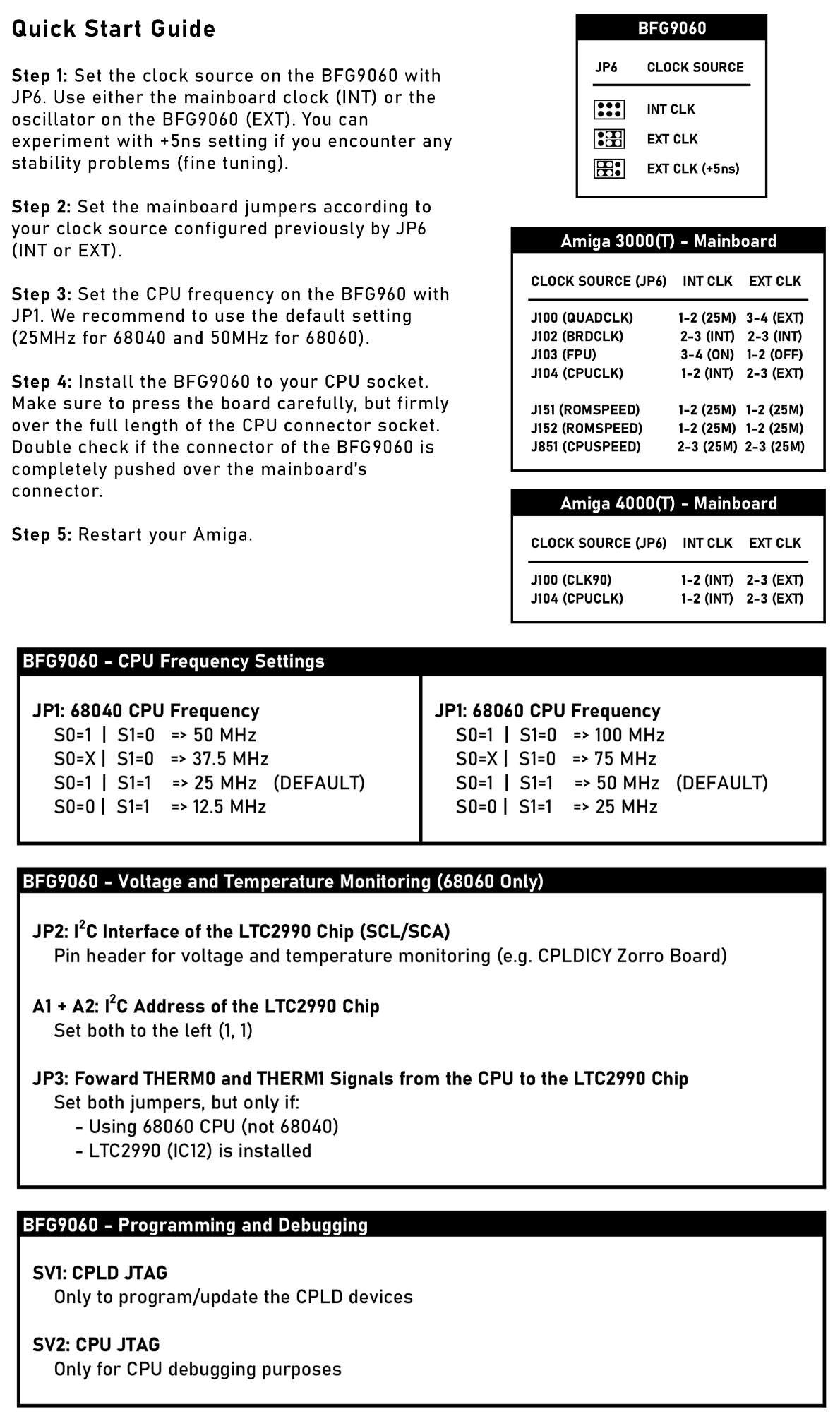
The full manual, written by Torsten Kurbad, is the BFG9060 README on GitLab.
Cooling, Turbo Mode and Monitoring
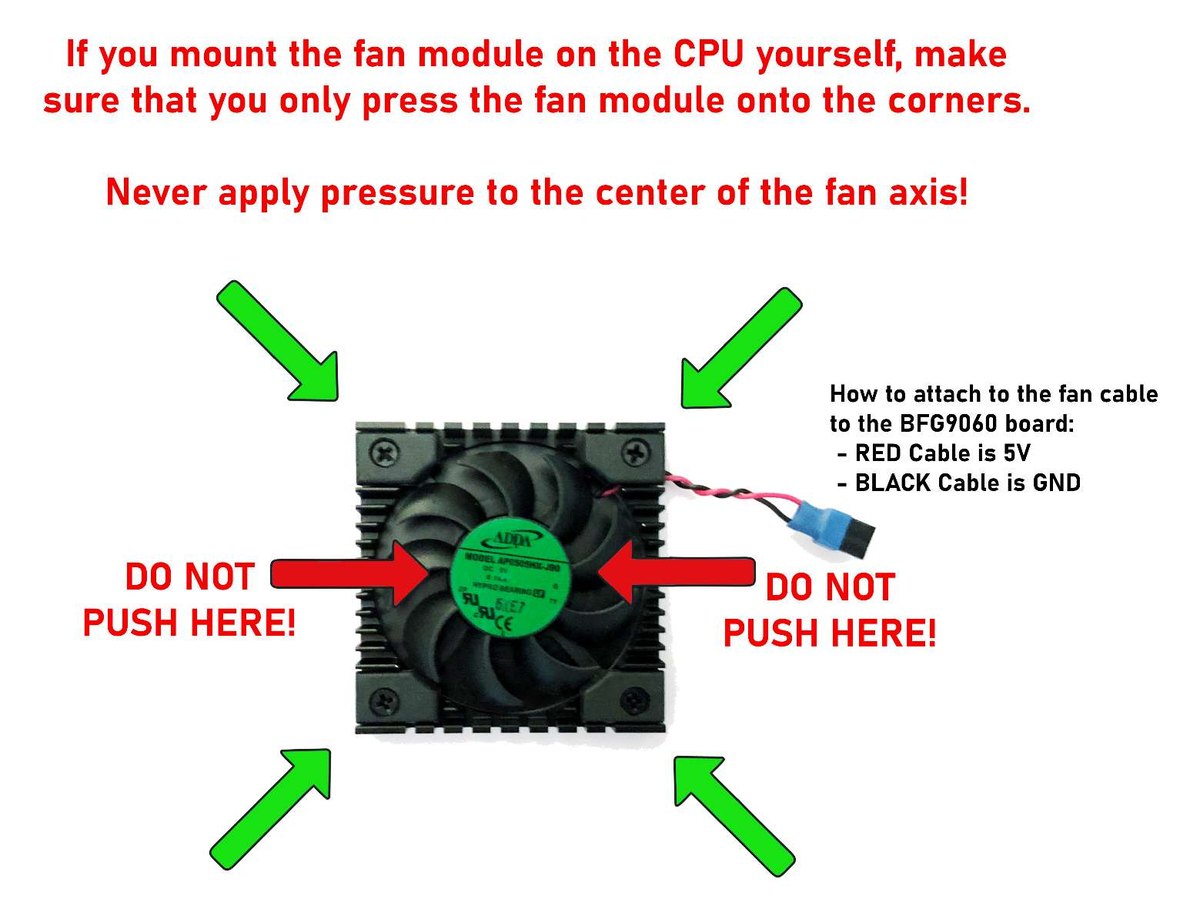
At 50 MHz a revision 6 MC68060 is the easy case. The older revisions 1 and 5 run quite a bit hotter, and active cooling is recommended for them. The heat sink/fan modules come in two heights: the high-profile module for the A3000T and A4000(T), the low-profile module for the A3000 desktop. The red wire goes to 5 V, the black wire to ground. If you fit a module yourself, press it onto the CPU at its corners only, never in the middle over the fan axis.
Turbo mode: with JP1, a revision 6 MC68060RC50 can run at 75 MHz or even 100 MHz in most cases, in the A4000 and A4000T only. I cannot guarantee a stable system with an overclocked CPU, overclocked CPUs are not covered by the warranty, and at 100 MHz cooling is a must. The nominal 50 MHz is my recommendation for everyday work; turbo mode is there for those who like to experiment.
With the optional LTC2990 monitor the board measures the CPU temperature and its supply voltages. Connect the JP2 header to an I2C controller such as the CPLDICY Zorro I2C controller and read the values with simplesensors or Sensei. Set both JP3 jumpers only with a 68060 and the LTC2990 fitted.
Complete the System: Storage and Network
A 68060 deserves fast storage and a network connection:
- Zorro III SCSI with DMA: the ReA4091 reaches 6-8 MB/s in practice, around 3-4 times faster than Zorro II IDE cards. It needs a Super Buster 11 chip. Pair it with a BlueSCSI v2 instead of an old mechanical SCSI drive.
- SSD, Ethernet and a clock port in one slot: the Multiface, described in my Multiface guide.
- Phase 5 Fastlane Z3 owners: the Fastlane needs ROM version 8 or later to work with a 68060. The Fastlane Z3 ROM Update 8.5 is the last release.
- A4000 internal IDE: the Amiga 4000 IDE Expansion lets the A4000 desktop use both IDE channels, up to four devices.
My Recommendations
- Amiga 4000(T): the BFG9060 with the MC68060RC50 revision 6 and the high-profile heat sink/fan module. Run it at 50 MHz, and try turbo mode if you like.
- Amiga 3000(T): the same board with the MC68060RC50 revision 6, with the low-profile module in the desktop A3000. Check the Kickstart ROM first and plan for the DMAC or a separate drive controller.
- 060 speed on a budget: the BFG9060 with the MC68LC060RC50.
- Amiga 1200: see my guide Upgrading the Amiga 1200 with a 68060 CPU.
Ready for 060 speed? Every BFG9060 comes with a two-year warranty. Choose your CPU and options on the BFG9060 product page. Not sure what fits your machine? Contact me and tell me what you have.