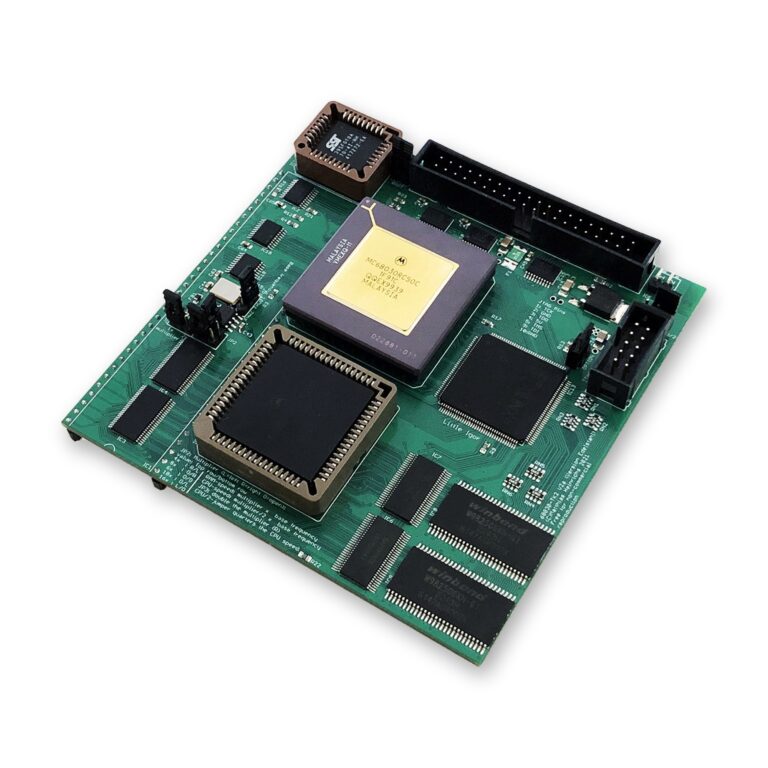
An Amiga 500 or 2000 with a 68030, an FPU, up to 128 MB of Fast RAM and a bootable Compact-Flash card, all from one board in the CPU socket: that is the TK68030v2. This guide shows what it makes possible, how fast it is, and how to fit and set it up.
What the TK68030v2 Opens Up
A stock Amiga 500 or 2000 runs a 68000 at 7 MHz, usually with little or no Fast RAM and no hard drive. The TK68030v2 changes all three at once:
- A hard drive without a side expansion: the on-board IDE port with its auto-boot ROM boots from a Compact-Flash card or a hard drive. No more disk swapping.
- WHDLoad: install your games to the drive and start them from Workbench. WHDLoad needs Fast RAM, and the TK68030v2 brings 64 MB or 128 MB.
- AmigaOS 3.2 on an A500: a modern Workbench with room to breathe, and with MMULib and MuFastRom the Kickstart runs from fast memory.
- Software that was out of reach: programs that need a 68020 or better, an FPU or plenty of memory, such as image processing, 3D rendering with the 68882 FPU, or a TCP/IP stack and a browser.
- A faster network: networking is CPU-bound, so a Plipbox or a Zorro network card in an A2000 gets noticeably quicker with a 68030.
How Fast Is It?
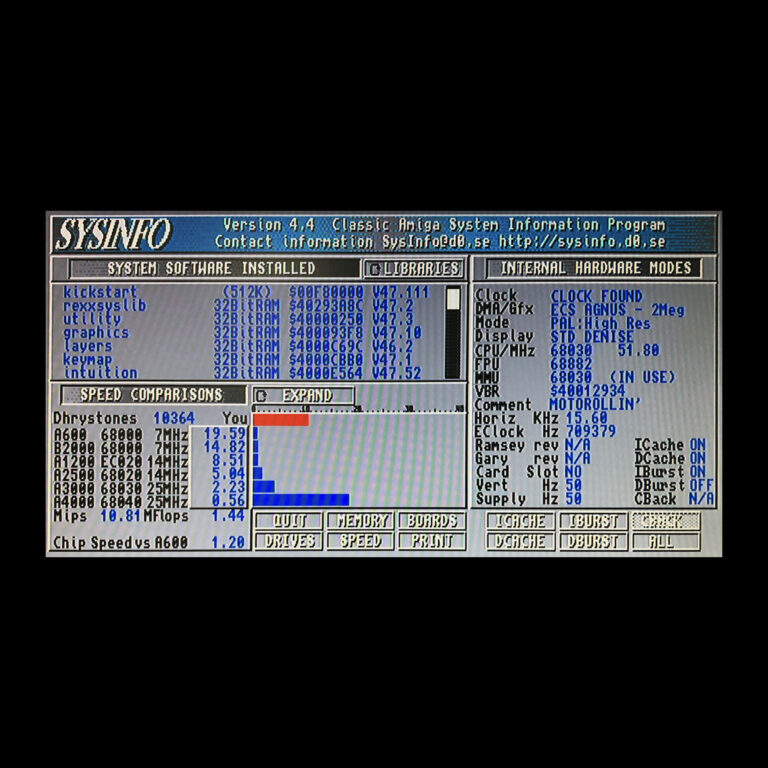
These values come from SysInfo on my test machine with a TK68030v2 at 51.8 MHz:
| SysInfo | TK68030v2 at 51.8 MHz |
|---|---|
| Dhrystones | 10,364 |
| MIPS | 10.81 |
| Compared with an A600 (68000, 7 MHz) | 19.59 times faster |
| Compared with a B2000 (68000, 7 MHz) | 14.82 times faster |
| Compared with an A1200 (EC020, 14 MHz) | 8.51 times faster |
| Compared with an A3000 (68030, 25 MHz) | 2.23 times faster |
At 50 MHz the TK68030v2 is more than twice as fast as a stock Amiga 3000, and in many cases it runs at up to 66 MHz.
The TK68030v2 at a Glance
The TK68030v2 is designed by Matthias Heinrichs. I build it under his official licence and pay a royalty for every board. It offers:
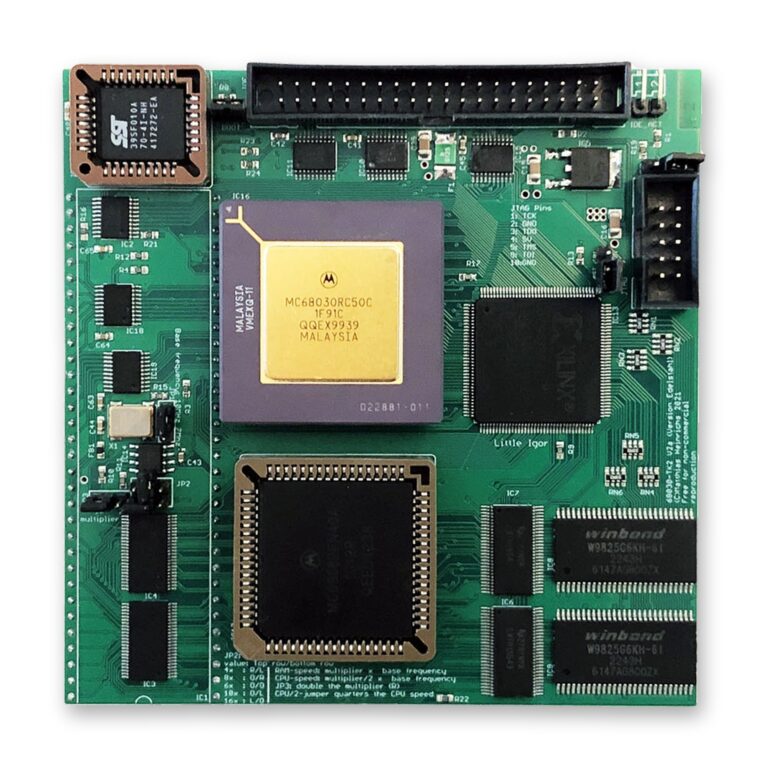
- a Motorola 68030 CPU, overclockable up to 66 MHz
- a Motorola 68882 FPU
- 64 MB or 128 MB of Fast RAM, running at up to 120 MHz
- an IDE controller with an on-board auto-boot ROM for hard drives and Compact-Flash cards, with the open-source LIDE driver (lide.device), which outperforms the old BSC AT-Bus / Oktapussy driver in every respect
- a CPU speed set by jumpers: 14, 15, 17, 20, 25, 28, 30, 35, 40, 50 or 66 MHz
My factory configuration: MC68030RC50 CPU and MC68882 FPU, both tested at 50 and 66 MHz, 128 MB of 32-bit Fast RAM and the LIDE ROM v40.12.
Installing the Board
The TK68030v2 goes into the 68000 CPU socket. In most A500 and A2000 models it touches a capacitor next to the socket:
| Mainboard | Capacitor | What to do |
|---|---|---|
| Amiga 500 rev 3 and rev 5 | C307 | Should not be a problem |
| Amiga 500 rev 6 and rev 8 | C816 | Bend it to the side |
| Amiga 2000 rev 4.x | None in the way | Nothing to do |
| Amiga 2000 rev 6.x | C421 | Bend it to the side |
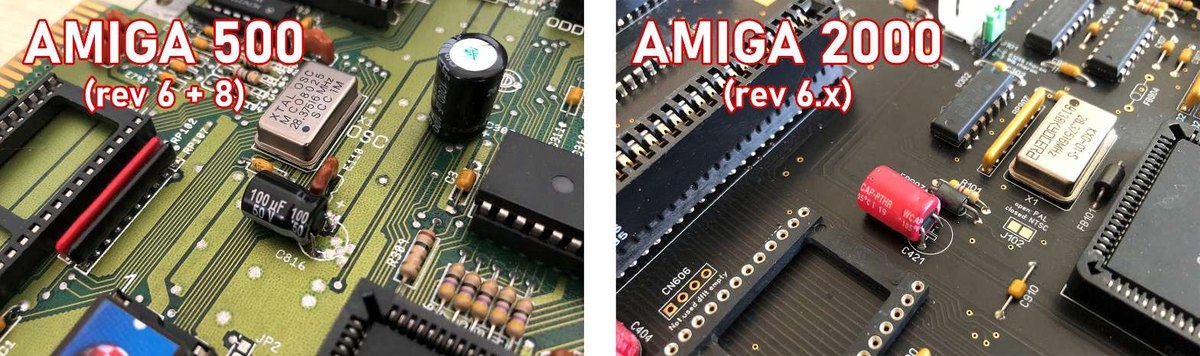
- Bend the capacitor 90 degrees to the side, so that it lies flat on the mainboard.
- Check all pins of the TK68030v2 and straighten any bent pin carefully with tweezers.
- Remove the old 68000 CPU if it is still in place.
- Insert the TK68030v2 carefully into the 68000 socket, press it down and check that it lies flat and level.
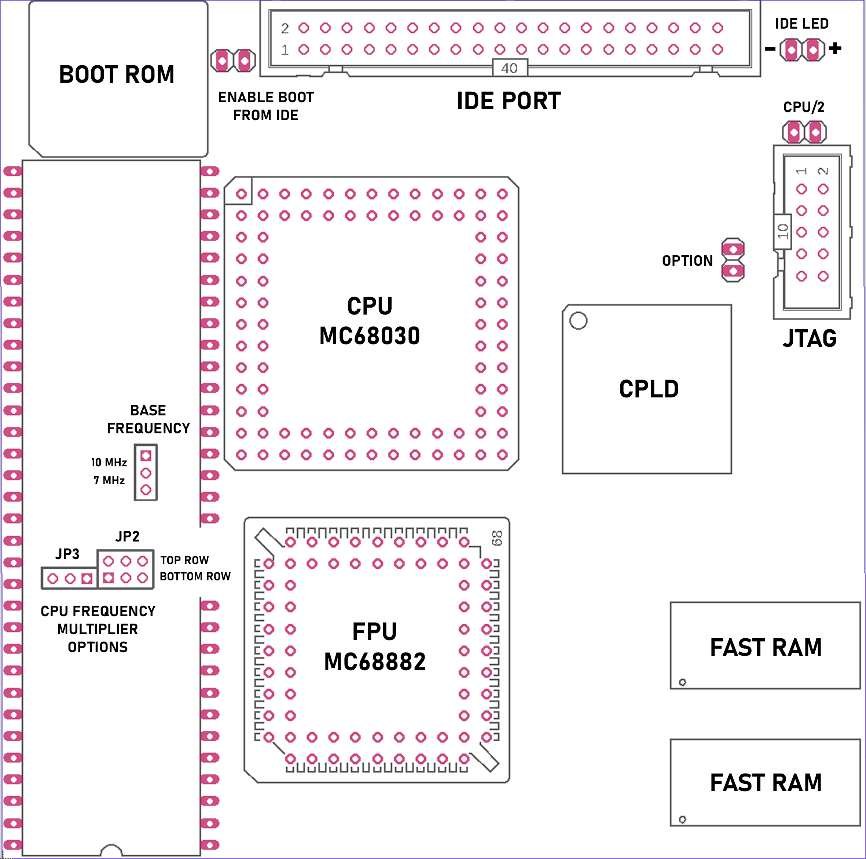
- If you boot from a drive on the TK68030v2, close the ENABLE BOOT FROM IDE jumper.
Setting Up the Software
- Drives: the IDE devices are reached through lide.device. In HDToolBox (right-click, Information), check the Tool Types, then partition the Compact-Flash card or hard drive. More about the driver: the LIDE project on GitHub.
- MMULib: to get the most out of the board, install the MMULib package from aminet.net, or the MMULib that comes with AmigaOS 3.1.4 or 3.2.
- Kickstart in Fast RAM: loading the Kickstart ROM into Fast RAM boosts performance noticeably. Add C:MuFastRom PROTECT ON to your S:Startup-Sequence after the SetPatch command and restart.
Choosing the CPU Speed
The board has a 10 MHz oscillator, so leave the base frequency jumper at 10 MHz. Three jumpers set the speed:
- JP2, the multiplier: CPU speed = multiplier / 2 × 10 MHz, RAM speed = multiplier × 10 MHz. A 10× multiplier gives 50 MHz for the CPU and 100 MHz for the RAM. Always set these jumpers horizontally, never vertically.
- JP3 doubles the multiplier: 6× doubled to 12× gives 60 MHz for the CPU and 120 MHz for the RAM.
- CPU/2 halves the CPU speed without touching the RAM speed.
A few rules for higher speeds: every frequency above a CPU’s rating is overclocking, and the MC68030RC50 is rated for 50 MHz. CPU and FPU run at the same frequency, so a slower FPU can hold the CPU back; the board also runs without an FPU. For the highest speed of 66 MHz, your Amiga should have new, high-quality capacitors, because they matter for the signal quality. Above 50 MHz, check the CPU temperature and use active cooling, a heat sink with a fan: overheating can destroy the CPU.
Complete the Upgrade
- Network: put your A500 or A2000 online with a Plipbox or a Multiface card. See my guide Getting Your Amiga Online.
- A2000 with free Zorro slots: the Multiface adds an SSD, Ethernet and a clock port; see the Multiface guide.
- Storage options compared: Amiga Storage Options Compared.
My Recommendations
- Amiga 500: the TK68030v2 with 128 MB and a Compact-Flash card on its IDE port: CPU, memory and bootable storage in one board, with no side expansion needed.
- Amiga 2000: the TK68030v2 in the CPU socket, plus a Multiface card in a Zorro slot for the network.
- For speed beyond 50 MHz: fresh capacitors in the Amiga and a heat sink with a fan on the CPU.
Turn your A500 or A2000 into a 68030 machine. Choose the memory size on the TK68030v2 product page. Questions about your mainboard revision? Contact me. Support and background: the official support thread on a1k.org and the project page.