Imagine a drive icon on your Workbench that opens a folder on your PC or NAS. You fetch a program from Aminet, unpack it and start it, and not a single floppy disk changes hands. In the evening you read your email in YAM or chat on IRC, and the clock is right every time you switch on. A network connection makes all of this possible, and the hardware is simpler to install than many people expect.
This guide is for owners of 68k Amigas, from the Amiga 500 to the A4000T. It shows what a network brings, which hardware fits your model and which software you need. At the end I name my pick for each model.
What a Network Connection Opens Up
- Files without disks. With an SMB client, a shared folder on your PC or NAS appears on the Amiga like another drive. With FTP you move files to and from any Windows, macOS or Linux machine. WHDLoad games, music modules, pictures and your own projects go across the network, and you can back up the Amiga’s hard drive to the NAS the same way.
- Aminet on the Amiga itself. Aminet, the large archive of Amiga software, is open to your Amiga directly. Download an archive straight to the hard drive, unpack it with LhA and install it, without a detour through the PC.
- Email. SimpleMail and YAM are full email programs for AmigaOS. Together with AmiSSL they handle the encrypted connections that most mail providers ask for today.
- IRC and chat. IRC is still very much alive, and Amiga owners meet in their own channels. AmIRC is the classic Amiga client.
- The right time. A small time-sync tool sets the Amiga’s clock from a time server at every boot. On models without a battery-backed clock, such as a stock A500 or A1200, your files finally get correct dates.
- Remote access. With Telnet or SSH you log in to a Linux machine, a Raspberry Pi or your NAS from an Amiga Shell window, or call one of the Telnet BBSes that are still running.
- The web, retro style. IBrowse 2.4 with AmiSSL, Voyager and AWeb show simple, text-based websites and pages made for vintage computers. Reading them on the Amiga’s own screen has its own charm.
Two Ways to Connect
- Ethernet through the parallel port (Plipbox): plugs in from outside and works on almost every model.
- A Zorro network card (Multiface, Multiface Mini): for big-box Amigas, faster, and combined with storage and a clock port.
The Plipbox: Ethernet for Almost Every Amiga
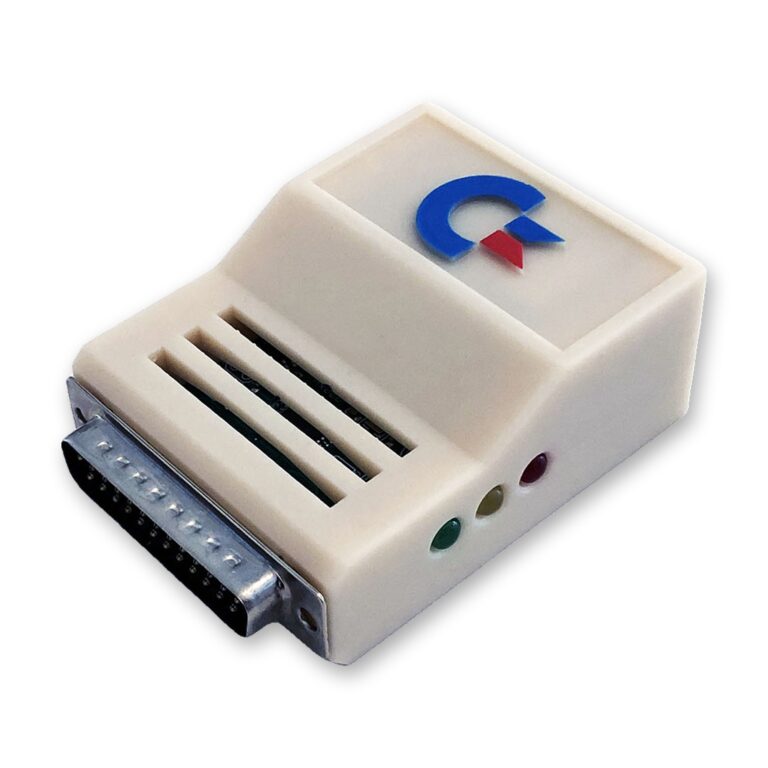
The Plipbox plugs into the Amiga’s parallel port and takes a normal Ethernet cable on the other side. You do not need to open your Amiga. It works with the Amiga 500, 600, 1000, 1200, 2000, 2500, 3000(T) and 4000(T) and the CDTV, which makes it the natural choice for every model without Zorro slots.
It comes in two versions with the same electronics: the Plipbox Deluxe and the Plipbox Barebone, the board without a housing. Both have three LEDs (power, network link, network activity) and a PhotoMOS relay that switches the adapter on and off together with your Amiga.
What you need:
- Kickstart 2.0 or higher and at least 2 MB of RAM. For a web browser, a hard drive and a 68020 or better CPU are recommended.
- A USB charger. The parallel port supplies only about 10 mA, so the Plipbox takes its power from a regulated 5 V USB charger, for example an old phone charger, connected to its USB-C port.
- The driver. The device driver and a setup manual for the TCP/IP stack come from lallafa, who designed the original Plipbox.
While the Plipbox is plugged in, it uses the parallel port, so a printer or another parallel device has to wait.
Amiga 1000
The Amiga 1000’s parallel port has a female connector and a different pinout. Every Plipbox is therefore also available as an A1000 edition with the correct connector and pinout; you select it in the drop-down menu on the product page. With that edition you do not need the separate Parallel Port Adapter, which is meant for other parallel devices built for the later models. Keep the Kickstart 2.0 requirement in mind: a stock A1000 loads Kickstart 1.x from its Kickstart disk.
Multiface and Multiface Mini: Zorro Cards for Big-Box Amigas
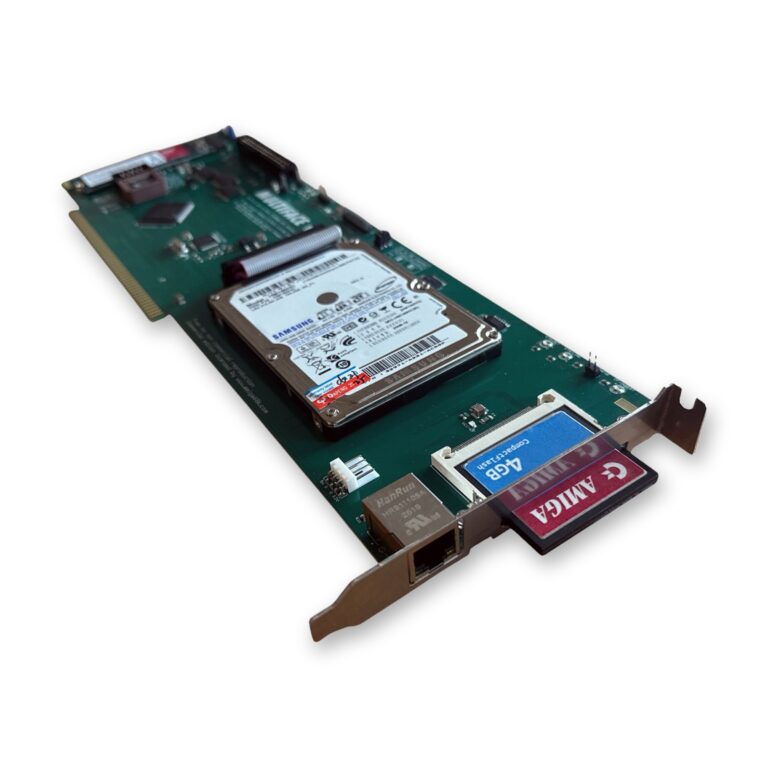
In a big-box Amiga, a Zorro card is the faster and tidier solution. It keeps the parallel port free, and both cards I carry combine network, IDE and a clock port in one slot.
The Multiface is for the Amiga 2000, 3000(T) and 4000(T). Next to Ethernet it has a 2-channel IDE interface for up to four IDE/ATAPI devices, a Compact-Flash slot, a SATA or M.2 SSD connector and an A1200-compatible clock port. In the A3000(T) and A4000(T) the Ethernet interface switches to Zorro III mode. An Amiga 2000 with a 68020 can expect up to 100 kB/s, an Amiga 4000 with a 68060 easily reaches over 600 kB/s.
Setting up the network is straightforward. The driver, enc624j6net.device, is on the floppy disk that comes with the card; copy it to SYS:Devs/Networks and point your TCP/IP stack to it. For a 68000 CPU there is a special version, enc624j6net.device_68000, which you rename to enc624j6net.device; on these machines Roadshow is the recommended stack. My Multiface guide walks you through the whole card, from the SSD to the network.
The Multiface Mini is the smaller board for the A2000, A3000, A4000, or an A500 with a Zorro interface. It has Fast Ethernet with a SANA-II compatible driver, a BSC AT-Bus compatible IDE controller with auto-boot ROM (Kickstart 1.3 to 3.2) and a clock port, for example for the RapidRoad. It detects Zorro II or Zorro III by itself.
Choose the Multiface if you also want to run an SSD from the same card; choose the Mini for network, IDE and a clock port in a simpler package, or for an A500 with a Zorro interface.
A Faster CPU Means a Faster Network
Processing network data in the TCP/IP stack is CPU-intensive, so the Amiga’s processor sets the pace, not your broadband line. The Plipbox reaches up to 96 kB/s in theory and gets faster with a faster CPU; detailed figures are in the Plipbox benchmarks on GitHub. On the Multiface the range runs from about 100 kB/s on an A2000 with a 68020 to over 600 kB/s on an A4000 with a 68060. When you measure, make sure the server you download from provides enough bandwidth.
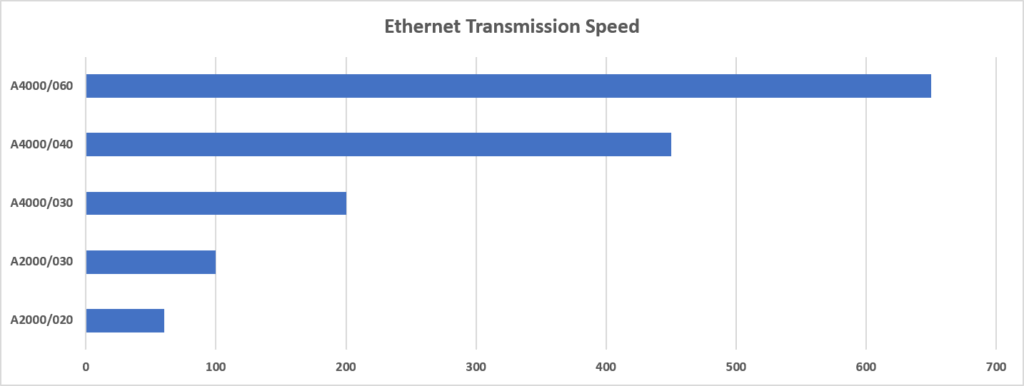
An accelerator therefore pays off twice: the network gets faster, and so does everything else. My guides cover the TK68030 v2 for the A500 and A2000, the 68060 upgrade for the Amiga 1200 and the 68060 upgrade for the A3000 and A4000.
The Software: a TCP/IP Stack
The network hardware talks to the system through a driver, usually a SANA-II device driver. On top of it runs a TCP/IP stack, the part that actually speaks the Internet’s language. The common choices are:
- Roadshow: a newer commercial stack, still maintained, and the one most people choose today.
- AmiTCP: the classic stack of the 1990s, still found on many installations.
- MiamiDX: the successor to Miami, with a graphical setup that was popular in the dial-up days.
- Genesis: a stack based on AmiTCP with a graphical setup, best known as the stack that came with AmigaOS 3.9.
Then add the programs for what you want to do: an SMB or FTP client, SimpleMail or YAM, an IRC client, a time-sync tool, Telnet or SSH, and a browser. AmiSSL provides the encryption that many of these programs use for secure connections.
The Web on a 68k Amiga
Most large websites today are built for powerful computers, with a lot of JavaScript and encryption that a 68k CPU has to calculate itself. Many of them load slowly or do not display properly. Simple, text-based sites and pages made for vintage computers work well, and so do encrypted sites with light pages once IBrowse has AmiSSL behind it. Think of the Amiga as a machine for files, mail, chat and the friendly corners of the web, and it will not disappoint you.
At a Glance
| Option | Models | Open the Amiga? | Speed | Also gives you |
|---|---|---|---|---|
| Plipbox Deluxe / Barebone | A500, A600, A1000 (A1000 edition), A1200, A2000, A2500, A3000(T), A4000(T), CDTV | No | Up to 96 kB/s in theory, depends on the CPU | – |
| Multiface | A2000, A3000(T), A4000(T) | Yes (Zorro slot) | Up to 100 kB/s (A2000, 68020) to over 600 kB/s (A4000, 68060) | 2-channel IDE, Compact-Flash, SATA or M.2, clock port |
| Multiface Mini | A2000, A3000, A4000, A500 with Zorro interface | Yes (Zorro slot) | Fast Ethernet, depends on the CPU | Auto-boot IDE, clock port |
My Picks per Model
- Amiga 500, 600 and 1200, CDTV: the Plipbox Deluxe, or the Plipbox Barebone if you do not need the housing. An A500 with a Zorro interface can also take the Multiface Mini.
- Amiga 1000: the A1000 edition of the Plipbox Deluxe, provided your A1000 runs Kickstart 2.0 or higher.
- Amiga 2000: the Multiface, or the Multiface Mini for a simpler set-up; without a free Zorro slot, a Plipbox.
- Amiga 3000(T) and 4000(T): the Multiface, whose Ethernet runs in Zorro III mode there.
- Files only, no network: the SDBox, a MicroSD adapter for the parallel port with up to 32 GB on FAT-formatted cards, for Amiga OS 1.3 or higher.
Not sure which option suits your machine and its expansions? Contact me, tell me what you have, and I will help you get your Amiga online or simply swap files between your PC and your Amiga.