Switch on your Amiga and Workbench comes up from silent flash storage, with your whole game collection and a modern AmigaOS one double-click away. Modern storage makes that possible on every Amiga from the A500 to the A4000, and it retires the thirty-year-old hard drive and the worn floppy disks before they let you down.
This guide is for Amiga owners who want reliable, roomy storage: what SD cards, CompactFlash, SSDs and BlueSCSI make possible, what each needs, and which one fits your model.
What Modern Storage Changes
- No more failing drives. CF cards, SD cards and SSDs have no motor and no heads. They are silent, and nothing has to spin up before the Amiga boots.
- Your whole game library on one drive. WHDLoad installs floppy games to the hard drive. Each one starts from a Workbench icon, without disk swapping, and most can be quit back to Workbench with a key. A card of a few gigabytes holds a complete collection.
- A modern Workbench. AmigaOS 3.2 is made for a hard drive. With gigabytes of space you install it alongside your programs, Aminet tools and your own projects, with room to spare.
- Easy exchange with your PC. Download on the PC, copy to a FAT-formatted card, read it on the Amiga. With a BlueSCSI the whole Amiga hard drive is an image file on an SD card: you back it up by copying one file, and you can keep several setups side by side.
- CD-ROM drives. An IDE port with ATAPI support takes a CD-ROM or DVD drive, so you can install software straight from CD.
- Real speed for big-box Amigas. An SSD on the Multiface or a Zorro III DMA SCSI controller such as the ReA4091 lets a fast A3000 or A4000 load large programs and data without waiting for the drive.
The Options at a Glance
| Option | Connects to | Bootable | File transfer with a PC | Best for |
|---|---|---|---|---|
| MicroSD adapter (SDBox) | Parallel port | No, drivers load from disk | Very easy (FAT/FAT32) | Transfers on any Amiga with a parallel port |
| PCMCIA CF adapter | PCMCIA slot (A600, A1200) | No, drivers load from the hard drive | Very easy (FAT/FAT32) | Amiga 600 and Amiga 1200 |
| CF card, drive or SSD on IDE | Internal IDE port or IDE card | Yes | Card has to come out; Amiga partitions | The main boot drive |
| BlueSCSI v2 | SCSI controller | Yes, with an autoboot controller | Easy: drive images are files on the SD card | Amiga 3000 and Amiga 4000T, or Amigas with a Zorro II or Zorro III SCSI controller |
MicroSD on the Parallel Port (SDBox)
The Amiga MicroSD Adapter (SDBox) is the simplest way to get files onto an Amiga. Revision 2.3 works on every Amiga with a parallel port; for the Amiga 1000 choose the A1000 version in the drop-down menu. There is also a barebone version without a housing.
It takes MicroSD cards of up to 32 GB formatted FAT16 or FAT32: copy files on your PC, plug the card in and read it on the Amiga as SD0:. Cards can be swapped without rebooting. It works with AmigaOS 1.3 and later and needs no hard drive: a boot disk mounts the card.
Before you order: it is powered by a USB charger and a Mini-USB cable (neither included), and the Amiga cannot boot from it. The parallel port is also slower than IDE or SCSI, so the SDBox is your transfer and archive drive rather than the drive Workbench runs from.
CompactFlash in the PCMCIA Slot (A600 and A1200)
With the PCMCIA Compact Flash Adapter, a FAT-formatted CF card in the side slot of the Amiga 600 or Amiga 1200 becomes your bridge to the PC: fill it there, slide it into the Amiga. The cfd and fat95 packages from Aminet are installed on the hard drive, so the adapter works together with an internal drive. Paired with an internal CF card, it makes a very comfortable A1200.
Bootable Storage on IDE
IDE is the usual way to a fast, bootable drive. The Kickstart ROM of the A600, A1200 and A4000 already contains the driver, so no extra software is needed to boot.
A600 and A1200: CompactFlash on the Internal 44-Pin Port
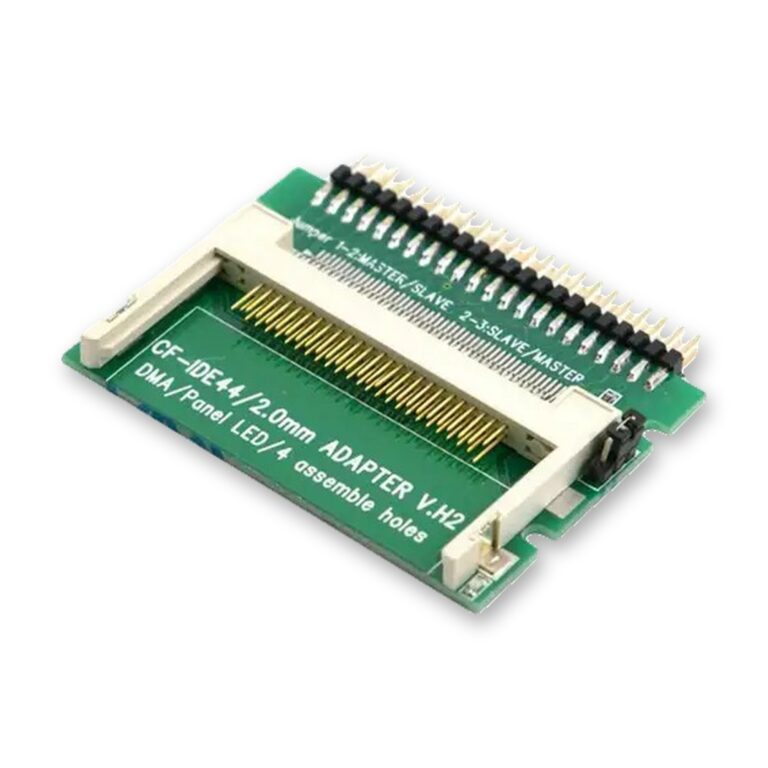
The Compact-Flash Adapter for IDE 2.5″ 44-Pin puts a silent CF card where the 2.5″ laptop drive used to be. It needs no power cable and no drivers; a jumper sets master or slave. In HDToolBox use Mask 0x7FFFFFFE and MaxTransfer 0x1FE00, and check the maximum partition size for your AmigaOS version.
The card carries Amiga partitions, which a PC cannot read on its own. For everyday transfers, add the PCMCIA adapter or an SDBox. Many owners also prepare the card in the WinUAE emulator on a Windows PC.
A4000: the Internal 40-Pin Port
The Amiga 4000 has a 40-pin IDE port with a primary and a secondary channel. The Amiga 4000 IDE Expansion (desktop A4000 only) lets you connect up to four devices, for example a CF card, a hard drive and a CD-ROM drive. If four devices cause trouble, IDEfix97 (AmigaOS 1.3 to 3.1) or AtapiMagic (3.1.4 to 3.2) helps; these packages are also the usual way to run an IDE CD-ROM drive. The 44-pin CF adapter above does not fit this port.
IDE on an Expansion Card
- The TK68030v2 accelerator for the A500 and A2000 has an IDE controller with an autoboot ROM (lide.device) for hard drives and CF cards, plus 64 MB or 128 MB of Fast RAM, which WHDLoad games are glad of. More in my guide TK68030v2: Speed, Fast RAM and IDE for the Amiga 500 and 2000.
- The Multiface Mini for the A2000, A3000, A4000 or an A500 with a Zorro interface adds IDE with an autoboot ROM (Kickstart 1.3 to 3.2), Ethernet and a clock port.
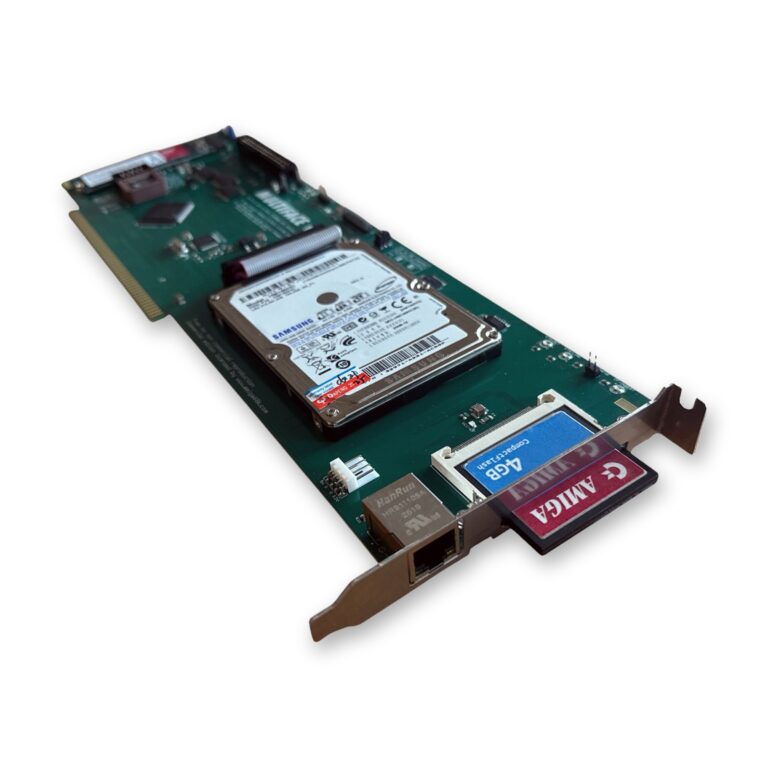
- The Multiface for the A2000, A3000(T) and A4000(T) brings SSD storage to a big-box Amiga. It has a socket for a SATA SSD and one for an M.2 SSD (use one or the other, never both), two IDE channels for up to four IDE/ATAPI devices including CD-ROM and DVD drives, and a CF slot you can reach from outside the case (switch the Amiga off before swapping the card). The M.2 drive must be a SATA (AHCI) M.2 2280 SSD with B and M key; NVMe drives are not supported. The IDE runs in Zorro II mode on every Amiga and transfers 1.6-2.6 MB/s in normal use. Ethernet and a clock port are on board; more in Multiface: SSD, Ethernet and a Clock Port in One Zorro Slot.
SCSI Emulation with BlueSCSI v2
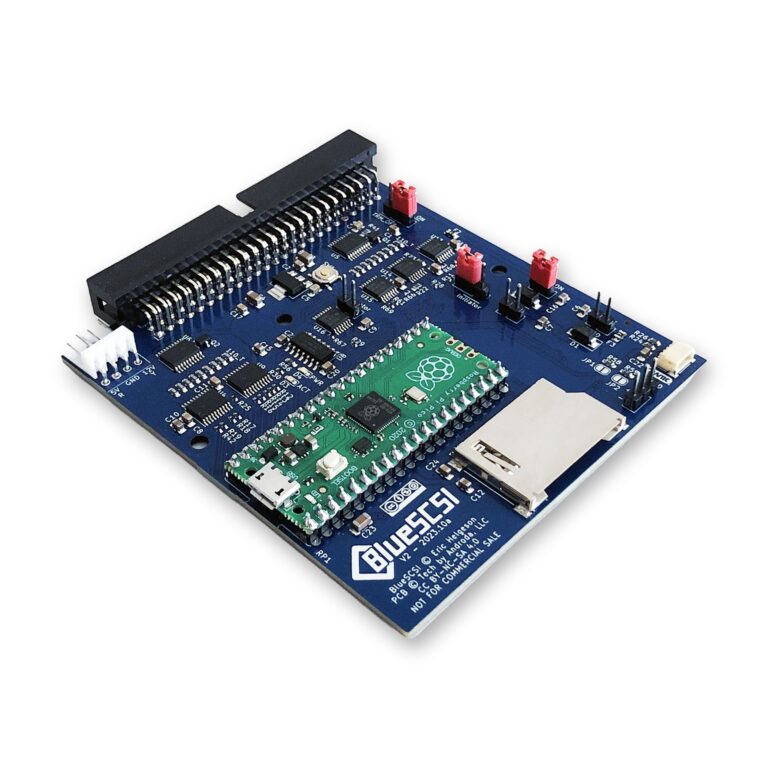
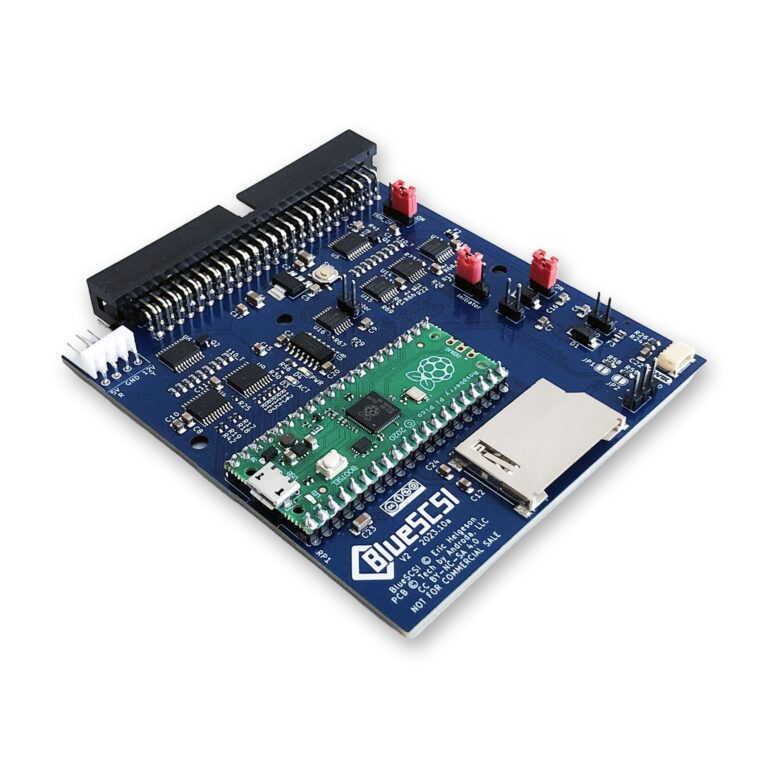
BlueSCSI v2 is an open-source device that replaces a mechanical SCSI drive with an SD card. The drive images are ordinary files on the card, so you prepare and back them up on your PC. It supports Fast SCSI at up to 10 MB/s in synchronous mode, and termination is set with a jumper. There is the BlueSCSI v2 (Internal 50 Pins) and the BlueSCSI v2 (External 25 Pin) for DB25 ports.
Format new SD cards with the SD Card Formatter tool first. Problems have been reported with some SanDisk types; I use Transcend 16 GB/32 GB UHS-I U1 TLC cards. Setup details are in the BlueSCSI documentation.
Which Amigas Have SCSI
- A3000(T): SCSI on board, internal 50-pin and external DB25. Either version fits.
- A4000T: SCSI on board next to IDE; the internal version fits.
- A2000: a Zorro II SCSI card such as the A2091 or a GVP Series II.
- A500: a side-mounted SCSI expansion such as the A590.
- A1200: a Blizzard SCSI Kit IV or an Apollo 1230/1240/1260 SCSI kit. The Blizzard/Apollo SCSI Kit Adapter Cable gives the kit a DB25 socket in the case; for the Blizzard kit there is the ROM Update 8.5.
- A3000 and A4000: the ReA4091 Zorro III Fast SCSI-II controller.
If your Amiga crashes or freezes with an external SCSI device attached, the old controller chip is often the cause. The AM33C93A-16PC is an enhanced replacement for the A3000(T), A590, A2090, A2091, GVP Impact boards and others; on some devices the old chip is soldered in.
Speed: the Controller Sets the Pace
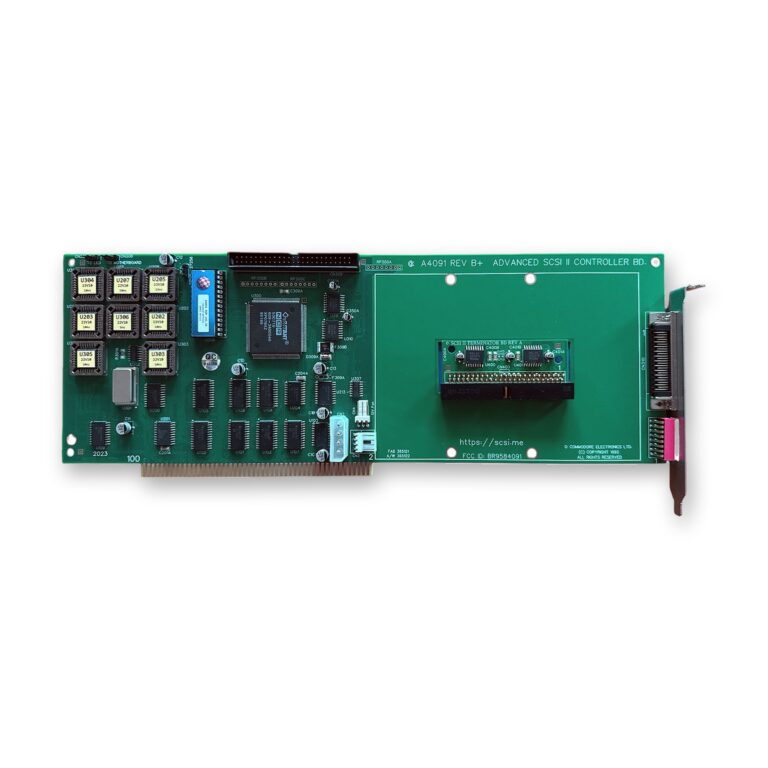
Zorro II SCSI controllers such as the A590, A2091 or GVP Series II have a theoretical maximum of 3.58 MB/s, so the controller, not the BlueSCSI, sets the limit.
The ReA4091 is the fast lane for an A3000 or A4000: a Zorro III DMA controller that reaches 6-8 MB/s in practice, depending on the CPU, around three to four times what Zorro II IDE cards manage. It comes with an active terminator, and its modern autoboot ROM handles hard disks larger than 4 GB (TD64 and NSD64) and can boot from CD-ROM. Your A3000(T) or A4000(T) needs a Super Buster 11 chip for it to work properly. A Phase 5 Fastlane Z3 needs ROM version 8 or later with a 68060; the Fastlane Z3 ROM Update 8.5 is the last release.
On an A3000 with a 68040 or 68060 board, SCSI hang-ups come from the DMAC chip. Neither a ReA4091 nor a BlueSCSI cures them; the DMAC has to be upgraded, which the ReSDMAC project is working on. My guide Upgrading the Amiga 3000(T)/4000(T) with a 68060 CPU covers this in more detail.
CDTV and CD32
The CDTV has a parallel port, so the SDBox works there too. Its drivers load from a boot disk, and the CDTV has no built-in floppy drive, so you need an external one. If a SCSI interface is fitted, a BlueSCSI can serve as its drive, and the AM33C93A fits that interface.
The CD32 has no parallel port, no IDE port and no PCMCIA slot. Storage comes through boards for its expansion port, some of which add IDE; I do not currently stock one.
My Recommendations per Model
- A500: the TK68030v2 for a bootable CF card and the Fast RAM WHDLoad likes, plus the SDBox for PC transfers. With an A590, a BlueSCSI v2.
- A600: the 44-pin CF adapter as the boot drive, plus the PCMCIA CF adapter for transfers.
- A1000: the A1000 version of the SDBox.
- A1200: the 44-pin CF adapter plus the PCMCIA CF adapter. With a Blizzard or Apollo SCSI kit, the adapter cable and an external BlueSCSI. Planning a 68060 as well? See Upgrading the Amiga 1200 with a 68060 CPU.
- A2000: the Multiface for an SSD, CD-ROM drive and Ethernet, or the TK68030v2 for IDE with a faster CPU and Fast RAM. With an A2091 or GVP card, a BlueSCSI v2.
- A3000(T): a BlueSCSI v2 on the built-in SCSI; for more speed the ReA4091 with a BlueSCSI, or the Multiface with an SSD.
- A4000: the Multiface with an SSD, or the ReA4091 with a BlueSCSI for the fastest SCSI; the A4000 IDE Expansion to add a CD-ROM drive on the built-in IDE.
- A4000T: an internal BlueSCSI v2 on the built-in SCSI.
- CDTV: the SDBox with an external floppy drive; a BlueSCSI if a SCSI interface is fitted.
Not sure which card suits your plans? Contact me with your model and a list of your expansions, and I will tell you which storage fits.